Configuration
Exports
| Name | Kind | Description |
|---|---|---|
WidgetIccandle | Component | Scanner overlay (host owns the results iframe) |
WidgetIccandleProps | Type | Props for WidgetIccandle |
WidgetChartMaskColors | Type | { light?: string; dark?: string } for chartMaskColors |
WidgetLanguage | Type | Supported locale codes |
withPlayChart | Function | Wraps a TradingView datafeed (or factory) for replay bar injection |
getCustomIndicators | Function | Returns iC Candle custom indicators (generated candles) |
GeneratedCandlesTheme | Type | "light" | "dark" for getCustomIndicators |
handleResultIframeLoad | Function | Posts parent-origin / payment-success to the results iframe on load |
useICCandleAuth | Composable | Host-side session: { isAuthenticated, idToken } from iccandle_token |
ICCandleAuth | Type | Return type of useICCandleAuth |
WIDGET_RESULT_URL | Const | "https://embed-iccandle-app.iccandle.ai" |
OPEN_PRICING_MESSAGE_TYPE | Const | "open-pricing" postMessage type |
postOpenPricingToEmbed | Function | Ask the results iframe to open pricing. Returns false if no contentWindow. |
postOpenPricingToParent | Function | Forward pricing to window.parent when this widget is itself embedded. |
postOpenPricingToWindow | Function | Post an open-pricing message to an arbitrary Window. |
OpenPricingMessage | Type | { type, theme?, language? } |
WidgetIccandle props
| Prop | Type | Required | Description |
|---|---|---|---|
chartWidget | IChartingLibraryWidget | null | Yes | Live TradingView widget (null until ready). Template: :chart-widget. |
submitCallback | (iframeSrc: string) => void | Yes | Called when a scan, news navigation, or pricing fallback should update the results iframe. Set your iframe src to this URL (optionally append header=false). Template: :submit-callback. |
theme | "light" | "dark" | "system" | No | Scanner chrome + iframe theme. "system" follows prefers-color-scheme. Defaults to "light". |
chartMaskColors | WidgetChartMaskColors | No | Per-theme color that hides unrevealed predicted candles. Must match the chart pane background. Defaults: { light: "#ffffff", dark: "#0F0F0F" }. Template: :chart-mask-colors. |
bg_dark | string | No | Embed page background for the dark theme. Hex, # optional. Omitted = no bg_dark query param. Template: bg_dark. |
bg_light | string | No | Embed page background for the light theme. Hex, # optional. Omitted = no bg_light query param. Template: bg_light. |
language | WidgetLanguage | No | UI + iframe locale. One of: en, zh, vi, th, ko, ja, mn, ru. Defaults to en. |
onCloseResult | () => void | No | Called when the embed posts selector.closeResult. Template: :on-close-result (prop callback, not an emit). |
iframeLoaded | boolean | No | When false, disables scan / track actions until the results iframe is ready. Defaults to true. Template: :iframe-loaded. |
resultIframeRef | { current: HTMLIFrameElement | null } | null | No | Results iframe box (not a Vue ref). Receives open-pricing and chart-resolution postMessages. Template: :result-iframe-ref. |
isShowScanButton | boolean | No | Show Scan inside the popup. Defaults to true. Template: :is-show-scan-button. |
isShowTrackerButton | boolean | No | Show Pattern Tracker inside the popup. Defaults to true. Template: :is-show-tracker-button. |
isShowScannerPopup | boolean | No | Show the scanner popup. Defaults to true. Template: :is-show-scanner-popup. |
availableIntervals | string[] | No | Resolutions allowed when drawing a pattern date range from embed selection. Template: :available-intervals. |
onScanClick | () => void | No | Fired when the user clicks Scan, before login / config / scan logic. Template: :on-scan-click. |
Default slot: place your chart UI as the child of WidgetIccandle. The slot also receives { chartRefs } (highlight bars + generated-candles study ids). The same chartRefs object is exposed via the component instance.
IChartingLibraryWidget must be imported from your Charting Library typings — this package does not re-export TradingView types.
submitCallback
Required. The host owns the results iframe. When the user runs a scan, opens similar events from a news mark, or (if no iframe ref / parent) requests pricing, WidgetIccandle builds a full embed URL and passes it to submitCallback. Update your iframe src with that value.
Typical URLs look like:
https://embed-iccandle-app.iccandle.ai/{locale}?symbol=…&res=…&ref_res=…&cid=…&tk=…&from=…&to=…&theme=light
https://embed-iccandle-app.iccandle.ai/{locale}/news/similar-events/{id}?symbol=…&theme=light
https://embed-iccandle-app.iccandle.ai/{locale}?pricing=true&theme=light
Optional scan filters may also be appended: fs (symbol filter), period, model (light / standard / plus / pro), temp (0.5 / 1 / 1.5). When bg_dark / bg_light are set, those colors are appended on the same URLs.
<script setup lang="ts">
import { ref, watch } from "vue";
import {
  WidgetIccandle,
  handleResultIframeLoad,
  WIDGET_RESULT_URL,
} from "@iccandle/vuejs-widget";

const iframeSrc = ref(`${WIDGET_RESULT_URL}/en?theme=light&header=false`);
const iframeLoaded = ref(false);
const resultIframeRef = ref<HTMLIFrameElement | null>(null);
const resultIframeBox = { current: null as HTMLIFrameElement | null };

watch(
  resultIframeRef,
  (el) => {
    resultIframeBox.current = el;
  },
  { immediate: true },
);

const submitCallback = (nextSrc: string) => {
  const url = new URL(nextSrc);
  url.searchParams.set("header", "false");
  const next = url.toString();
  if (iframeSrc.value !== next) {
    iframeSrc.value = next;
  }
};

const handleIframeLoad = () => {
  iframeLoaded.value = true;
  handleResultIframeLoad(resultIframeRef.value);
};
</script>

<template>
  <WidgetIccandle
    :chart-widget="chartWidget"
    :submit-callback="submitCallback"
    theme="light"
    language="en"
    :iframe-loaded="iframeLoaded"
    :result-iframe-ref="resultIframeBox"
  >
    <!-- chart -->
  </WidgetIccandle>
  <iframe
    ref="resultIframeRef"
    :src="iframeSrc"
    title="iC Candle results"
    @load="handleIframeLoad"
  />
</template>
result-iframe-ref is a mutable { current } box, not a Vue ref. Sync it from the iframe element as shown above.
header=false
Append header=false on the embed URL (initial src and inside submitCallback) to hide the embed app header when your host already provides navigation. Footer and in-page UI still render; nav.click messages from header tabs will not fire.
Scanner-built URLs include scan params and theme but do not add header=false automatically — set it in the host when needed.
See Search params → header for full embed query-param details.
handleResultIframeLoad(iframe)
Call this from your results iframe @load handler. It posts the host origin to the embed (for Stripe return and so auth.signIn is addressed to the correct host) and, when the parent URL has ?payment=success, posts payment-success so the embed refreshes subscription state.
parent-origin is retried at 0 / 300 / 1000 / 2500 ms because the embed has no message buffering — its listener must be mounted before the message arrives.
import { handleResultIframeLoad } from "@iccandle/vuejs-widget";

handleResultIframeLoad(resultIframeRef.value);
useICCandleAuth()
Host-side view of whether the results iframe is already signed in. Reads iccandle_token, rejects JWTs within 60 seconds of exp, and updates on auth.signIn / auth.signOut.
import { useICCandleAuth } from "@iccandle/vuejs-widget";

const { isAuthenticated, idToken } = useICCandleAuth();
| Field | Type | Description |
|---|---|---|
isAuthenticated | Ref<boolean> | true when iccandle_token is present and unexpired |
idToken | Ref<string | null> | Live identity token, or null when signed out |
For corporate partners: watch isAuthenticated first, then call get-user-token only when it is false. See Seamless auth example.
withPlayChart(datafeed)
Required for chart replay / predict. Wraps your TradingView datafeed’s subscribeBars so the widget can:
- Inject replay bars into the live tick stream when the embed posts
chart.play,chart.stop, or replay payloads. - Block live ticks while playback is active, so real-time updates do not overwrite predicted candles.
Signature
withPlayChart(datafeed: IBasicDataFeed): IBasicDataFeed
| Argument | Type | Description |
|---|---|---|
datafeed | IBasicDataFeed | Ready datafeed instance (must expose onReady). |
factory, ...args | function overload | Optional: pass a factory plus args; withPlayChart invokes it and wraps the result. |
Usage
import { withPlayChart } from "@iccandle/vuejs-widget";

datafeed: withPlayChart(myDatafeed),
// or: withPlayChart(createDatafeed, arg1, arg2)
Notes
- The returned object is still a normal datafeed; only
subscribeBarsis wrapped. Other methods such as optionalgetTimescaleMarksare left unchanged. - Pair with
getCustomIndicators— without both, replay / predict overlays will not work.
getCustomIndicators(theme?)
Registers iC Candle’s custom studies used to draw generated / predicted candles on top of the main series. Returns a Promise of TradingView CustomIndicator[] for custom_indicators_getter.
Signature
getCustomIndicators(theme?: "light" | "dark"): Promise<readonly CustomIndicator[]>
| Argument | Type | Default | Description |
|---|---|---|---|
theme | "light" | "dark" | "light" | Pane mask color so predicted bars hide the underlying series. Must match the chart theme. |
Studies returned
| Study name | Role |
|---|---|
Generated Candles Background - By iC Candle | Hidden mask layer that paints over real bars at predicted timestamps. |
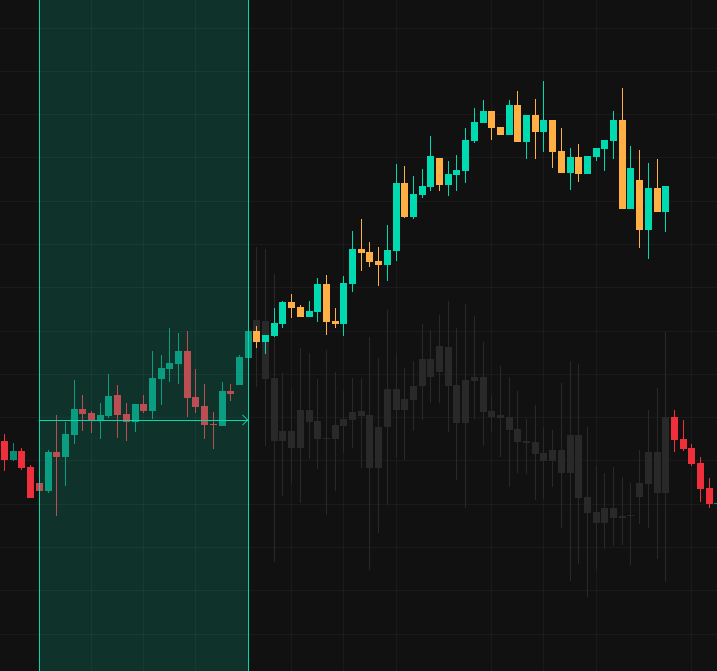
Generated Candles - By iC Candle | Visible OHLC overlay (bullish #00dfb9 / bearish #ffb84d) for predicted candles. |
WidgetIccandle creates and drives these studies when the embed sends replay / predict data.
Usage
import { getCustomIndicators } from "@iccandle/vuejs-widget";

const options: ChartingLibraryWidgetOptions = {
  // ...
  datafeed: withPlayChart(yourDatafeed),
  custom_indicators_getter: () => getCustomIndicators("light"),
};
Keep getCustomIndicators(theme) in sync with the chart widget theme (and preferably with WidgetIccandle’s theme prop). After the studies are created, WidgetIccandle overrides the background-study color from chartMaskColors so unrevealed predicted bars match the pane.
Together with withPlayChart
| Helper | Job |
|---|---|
withPlayChart | Lets the widget push bars into the datafeed and mute live ticks during playback. |
getCustomIndicators | Draws the predicted candle visuals (mask + colored OHLC) as custom studies. |
Both are required for replay / predict from the results iframe.
chartMaskColors
During replay / predict, the widget draws generated candles and hides bars that have not been revealed yet by painting them in a solid mask color. That color must match the TradingView pane background (paneProperties.background); otherwise unrevealed bars show up as visible blocks ahead of the replay cursor.
| Key | Default | When it is used |
|---|---|---|
light | #ffffff | theme="light", or theme="system" when the OS is in light mode |
dark | #0F0F0F | theme="dark", or theme="system" when the OS is in dark mode |
Only the entry for the active theme is applied. Each key is optional — omit one to keep its default. Any CSS color string the charting library accepts works; do not use transparency, or the real series bleeds through.
If your chart pane is not the default white / #0F0F0F, pass matching values:
<WidgetIccandle
  :chart-widget="chartWidget"
  :submit-callback="submitCallback"
  theme="dark"
  :chart-mask-colors="{ dark: '#2F2F2F', light: '#ffffff' }"
>
  <!-- chart -->
</WidgetIccandle>
WidgetIccandle applies this color as an override on the Generated Candles Background study. Changing chartMaskColors or theme recreates those studies, so the host can update it when the chart background changes.
This is not the scan-window (date_range) fill — that uses --iccandle-primary on .iccandle-selector-widget.
bg_dark and bg_light
Optional hex colors for the results iframe page background. The widget appends them as bg_dark and bg_light query params on embed URLs it builds: scan results, news detail, and the pricing fallback.
| Prop | Query param | Applied when |
|---|---|---|
bg_dark | bg_dark | The embed theme resolves to dark |
bg_light | bg_light | The embed theme resolves to light |
A leading # is optional (#131722 and 131722 are the same). 3-, 6-, and 8-digit hex are accepted. An empty or non-hex value is dropped, so that param is not added. Omit a prop to leave that theme on the embed default. Omit both and the widget adds no bg_* params.
The host owns the initial iframe src. Include the same params there so the first load matches. After the embed sees a valid color it stores it, and later navigations that omit bg_* keep that color.
<script setup lang="ts">
import { ref } from "vue";
import { WIDGET_RESULT_URL } from "@iccandle/vuejs-widget";

const iframeSrc = ref(
  `${WIDGET_RESULT_URL}/en?theme=dark&header=false&bg_dark=131722&bg_light=ffffff`,
);
</script>

<template>
  <WidgetIccandle
    :chart-widget="chartWidget"
    :submit-callback="submitCallback"
    theme="dark"
    bg_dark="#131722"
    bg_light="#ffffff"
  >
    <!-- chart -->
  </WidgetIccandle>
</template>
These props set the embed page background. Replay masking on the chart stays on chartMaskColors.
See Search params → bg_dark and bg_light.
Pricing helpers
When the user clicks upgrade in scanner settings, the widget posts open-pricing to the results iframe (resultIframeRef), then to window.parent, then falls back to submitCallback with ?pricing=true.
You can also trigger pricing yourself:
import { postOpenPricingToEmbed } from "@iccandle/vuejs-widget";

postOpenPricingToEmbed(resultIframeRef.value, {
  theme: "light",
  language: "en",
});
Auth and storage
Use useICCandleAuth() to read the live session from the host. Corporate partners should watch isAuthenticated before calling get-user-token — see Seamless auth example.
| Key | Purpose |
|---|---|
iccandle_token | Bearer token for scan cache, pattern tracker, and related APIs. Set by the embed via auth.signIn; cleared on auth.signOut. |
search-filter | Persisted scanner advanced options (symbols, top_k, period, model, temperature). |
search-filter-session | Session-scoped copy of advanced filters when the user does not persist them. |
scanner-always-show | Whether the scanner stays visible ("true" / unset). |
tv:selected-news-events | JSON array of news events used as timescale marks. |
tv:clicked-news-event | Last clicked calendar event for mark highlighting. |
tv:latest-symbol | Last chart symbol (used by the demo app / fallbacks). |
postMessage bridge
Messages are accepted only from the results origin (https://embed-iccandle-app.iccandle.ai). Embed → parent payloads use a structured { name, data } shape.
| Direction | Name | Effect |
|---|---|---|
| Embed → parent | chart.play / chart.stop | Inject / clear replay candles on the chart |
| Embed → parent | selector.loading | Toggle scanner loading UI |
| Embed → parent | auth.signIn | Persist iccandle_token from data.idToken |
| Embed → parent | auth.signOut | Remove iccandle_token |
| Embed → parent | selector.closeResult | Clears play state; calls onCloseResult |
| Embed → parent | pattern.classicPatternSelected / pattern.custom_pattern_selected | Draw date range for the compared pattern |
| Embed → parent | pattern.clearClassicPatternSelected / pattern.clear_custom_pattern_selected | Remove pattern date range |
| Embed → parent | news.eventClicked | Center chart, draw event line, show mark |
| Embed → parent | news.back / news.backToSimilarEvents | Clear event line / replay |
| Embed → parent | nav.click | Clear date range on /news routes |
| Embed → parent | chart.requestResolution | Re-post the current chart resolution to the iframe |
| Parent → embed | parent-origin | Host origin for Stripe return |
| Parent → embed | payment-success | Refresh subscription after checkout |
| Parent → embed | open-pricing | Ask the embed to open pricing (requires resultIframeRef) |
| Parent → embed | chart-resolution | Current chart resolution (posted when iframeLoaded becomes true) |
Host → embed helpers use { type: "parent-origin" | "payment-success" | "open-pricing" | "chart-resolution", ... }.
Optional: timescale marks (news/events)
News marks on the time axis are optional. WidgetIccandle does not add them. To show calendar / economic events, implement TradingView’s getTimescaleMarks on your datafeed — the object you pass into withPlayChart. withPlayChart only wraps subscribeBars, so your getTimescaleMarks still runs as-is.
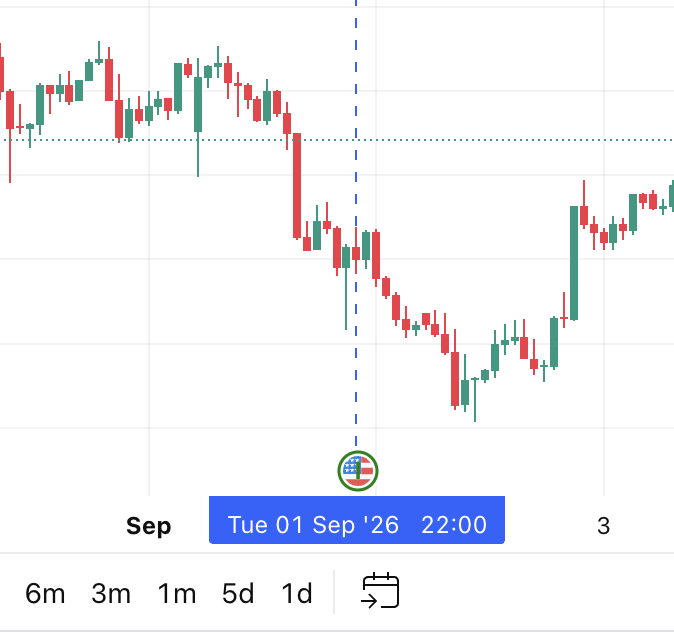
Advertise support in the datafeed onReady configuration (supports_timescale_marks: true), or the library will not call getTimescaleMarks.
The widget writes events to localStorage. Your implementation should read those keys and return marks:
| Key | Value | Mark |
|---|---|---|
tv:clicked-news-event | One event JSON | Blue mark, rich tooltip (actual / forecast / previous) |
tv:selected-news-events | Event array JSON | Green marks |
Event timestamp is unix milliseconds; TradingView marks use unix seconds (time: timestamp / 1000). Event shape: NewsEvent.
import type {
  GetMarksCallback,
  LibrarySymbolInfo,
  TimescaleMark,
} from "charting_library/charting_library";

type NewsEventType = {
  id: string;
  timestamp: number; // unix ms
  event_name: string;
  currency?: string;
  actual?: string;
  forecast?: string;
  previous?: string;
};

const yourDatafeed = {
  // ...onReady, resolveSymbol, getBars, subscribeBars, ...
  getTimescaleMarks: async (
    _symbolInfo: LibrarySymbolInfo,
    _from: number,
    _to: number,
    onResult: GetMarksCallback<TimescaleMark>,
  ) => {
    const marks: TimescaleMark[] = [];

    const pushEventMark = (
      event: NewsEventType,
      options?: { color?: TimescaleMark["color"]; richTooltip?: boolean },
    ) => {
      const { id, timestamp, event_name, currency, actual, forecast, previous } =
        event;
      if (!id || !Number.isFinite(timestamp) || timestamp <= 0) return;
      if (marks.some((m) => String(m.id) === String(id))) return;

      const tooltip = options?.richTooltip
        ? [
            event_name,
            currency ? `Currency: ${currency}` : null,
            actual ? `Actual: ${actual}` : null,
            forecast ? `Forecast: ${forecast}` : null,
            previous ? `Previous: ${previous}` : null,
          ].filter((line): line is string => Boolean(line))
        : [event_name];

      marks.push({
        id,
        time: timestamp / 1000,
        color: options?.color ?? "green",
        label: event_name.slice(0, 1) || "N",
        tooltip,
        ...(currency
          ? {
              imageUrl: `https://cdn.backprop.services/symbols/${currency}.svg`,
            }
          : {}),
        showLabelWhenImageLoaded: true,
      });
    };

    try {
      const clickedEvent = JSON.parse(
        localStorage.getItem("tv:clicked-news-event") || "null",
      ) as NewsEventType | null;
      if (clickedEvent) {
        pushEventMark(clickedEvent, { color: "blue", richTooltip: true });
      }
    } catch {
      // no-op
    }

    try {
      const allNewsEvents = JSON.parse(
        localStorage.getItem("tv:selected-news-events") || "[]",
      ) as NewsEventType[];
      allNewsEvents?.forEach((event) => pushEventMark(event));
    } catch {
      // no-op
    }

    onResult(marks);
  },
};
Then wrap as usual: datafeed: withPlayChart(yourDatafeed).
Theming
Scanner UI uses CSS variables on .iccandle-selector-widget:
--iccandle-primary--iccandle-primary-gradient-end--iccandle-background--iccandle-border--iccandle-text--iccandle-secondary--iccandle-font
Light and dark defaults live in the bundled stylesheet. The theme prop toggles the .iccandle-dark class and is forwarded to the iframe URL via submitCallback. Pass bg_dark and bg_light to set the embed page background.
Replay mask color is not a CSS variable: set chartMaskColors to match paneProperties.background.
Layout helpers
Injected CSS includes split-pane classes used by the demo:
| Class | Role |
|---|---|
.iccandle-selector-widget__container | Flex row (stacks below 1024px). --chart-pane-size defaults to 60%. |
.iccandle-selector-widget__chart-pane | Chart column. |
.iccandle-selector-widget__resize-handle | Drag handle; add --stacked for the stacked layout. |
.iccandle-selector-widget__iframe | Results pane. |
Behavior summary
- Subscribes to chart readiness, resolution, symbol changes, visible range, drawings, and timescale-mark clicks.
- Manages a
date_rangemultipoint drawing so the user can adjust the bar window (default: 25 bars). - Posts candles to
https://scan-service.iccandle.ai/cacheCandle, then callssubmitCallbackwith an embed URL (symbol,res,ref_res,cid,tk,from,to, filters,theme, andbg_dark/bg_lightwhen set). - Syncs with the host-owned results iframe at
https://embed-iccandle-app.iccandle.aiviapostMessage.