Introduction
Hosted results app for partners who already have their own chart UI. You load iC Candle in an iframe, pass search params, and sync your host with the embed over postMessage.
There is no npm package for this integration. Your app owns the chart, layout, and scan trigger; the iframe provides the hosted results UI, pattern tracker, news flows, auth, and billing.
Production base URL:
https://embed-iccandle-app.iccandle.ai/{locale}
| Surface | Role |
|---|---|
| Selector(scan) results | Pattern search UI driven by query params such as symbol, res, ref_res, cid, tk, model, and temperature |
| Pattern tracker | Tracked and common pattern flows under /{locale}/pattern (only flag patterns are activatable today) |
| News / events | Calendar and similar-event flows under /{locale}/news |
| Auth & billing | Sign-in happens inside the iframe; Stripe checkout returns to your parent origin |
Prerequisites
| Requirement | Details |
|---|---|
| Host page | A page that can render an iframe beside or below your chart |
| Chart integration | Your own chart implementation that can respond to selection, replay, and news events |
| API access for scans | If you run scans from your host, store the idToken from auth.signIn as iccandle_token and call cacheCandle with a Bearer token |
Quick start
<iframe
  id="iccandle"
  src="https://embed-iccandle-app.iccandle.ai/en?theme=light&header=false"
  title="iC Candle"
  allow="clipboard-write; payment"
  style="width: 100%; height: 100%; border: 0;"
></iframe>
Use a locale path such as /en or /zh, optional theme of light, dark, or system, and header=false to hide the embed header when the host already provides navigation.
Do not sandbox the iframe in a way that blocks popups or top-level navigation, because sign-in and Stripe checkout depend on them.
When to use this
| Use | Package / surface |
|---|---|
| React + TradingView Charting Library | ReactJS Widget — scanner overlay + iframe wired for you |
| Vue + TradingView Charting Library | VueJS Widget — scanner overlay + iframe wired for you |
| Your own chart / framework | Iframe Embed — you build the host UI and drive the iframe URL |
Typical flow
- Embed
https://embed-iccandle-app.iccandle.ai/{locale}?theme=…. - On iframe load, post your parent origin so billing flows can return to your domain after Stripe checkout.
- User signs in inside the iframe; listen for
auth.signInand storedata.idTokenasiccandle_tokenif your host calls scan APIs. - On scan:
POSTthe selected candles tocacheCandle, then set the iframesrcwithcidand the other search params. - Handle embed-to-parent messages such as
chart.play,chart.stop, pattern selection, and news events to update your chart.
Auth workflow
Sign-in runs inside the iframe via a popup. Your host only needs to send the parent origin on load and listen for auth.signIn.
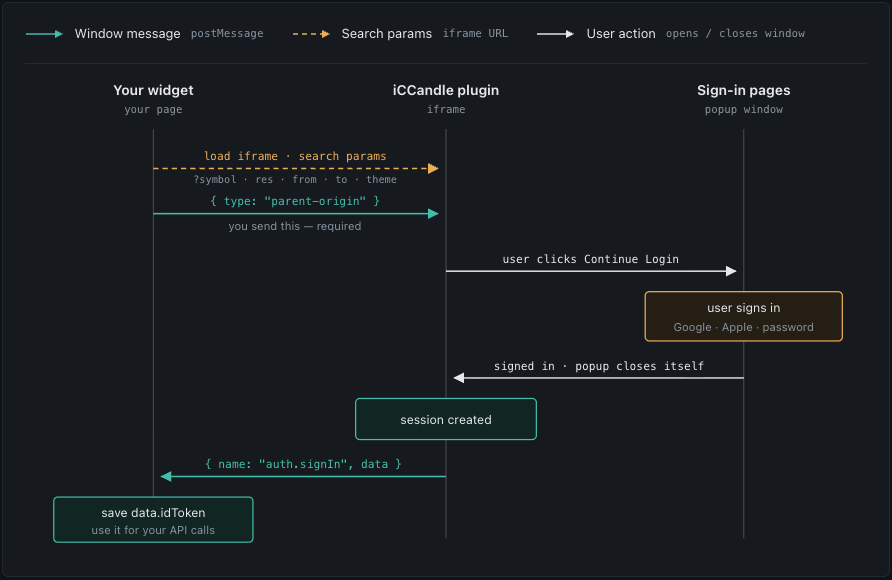
- Load the iframe with search params (
symbol,res,from,to,theme, and so on). - On load,
postMessage{ type: "parent-origin", origin }to the iframe (required for billing return URLs) — see Get started → Send parent origin. - User clicks Continue Login in the embed; a sign-in popup opens (Google, Apple, or password).
- After sign-in, the popup closes, the embed creates a session, and posts
{ name: "auth.signIn", data }to your page. - Save
data.idToken(for example asiccandle_token) and use it as a Bearer token for host-side API calls such ascacheCandle.
Locales
Path segment {locale} is one of: en, zh, vi, th, ko, ja, mn, ru (default en).
Recent embed changes
| Change | What partners should know |
|---|---|
| Header toggle | Pass header=false to hide the embed app header and divider |
| Search results UI | Redesigned scanner results panel, match charts, article/event detail modals, and AI-movements controls |
| AI scan hints | Optional model (light | pro) and temperature (0.5 | 1 | 1.5) query params feed the results UI |
| Common patterns | Only Bullish/Bearish Flag (flagbull / flagbear) can be activated; other common pattern types are disabled and deep links redirect |
| Chat chrome | Pattern AI chat input uses the main page background so it blends with the results panel |
Next steps
- Get started — iframe bootstrap, parent-origin handshake, auth,
cacheCandle, and scan URL - Auth workflow — sign-in sequence diagram and host responsibilities
- Search params — required and optional iframe query params for scanner flows
- Window messages — parent/embed message catalog and routing guidance
- Data types — shared payload shapes for candles, replay, news, and auth
- API reference — query params, routes, and protocol details